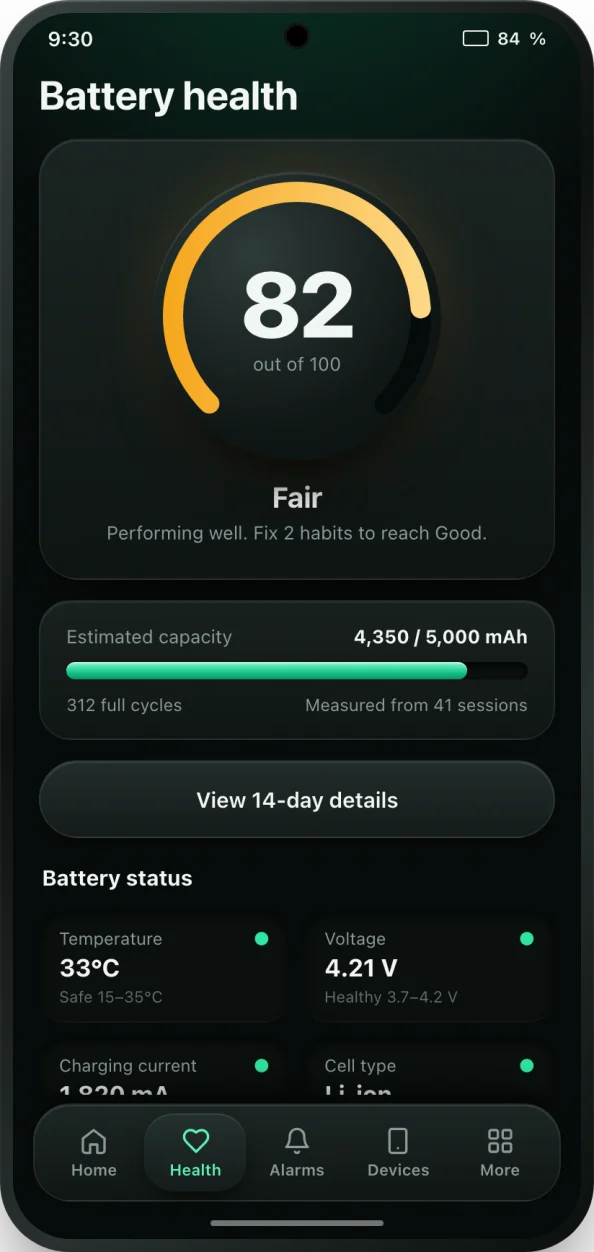
The formula
Battery health is the capacity a battery can hold today divided by its design capacity, the capacity it was rated for when new:
- Battery health (%) = full charge capacity (mAh) / design capacity (mAh) × 100
A phone with a 5,000 mAh design capacity that now holds 4,300 mAh is at 4,300 / 5,000 × 100 = 86% health. The 700 mAh it has lost is gone for good; it means less screen time from every charge.
Measuring capacity from a partial charge
You rarely know the full charge capacity directly. What you can measure is how many mAh go into the battery during a charge. If a charge from 20% to 80% adds 2,580 mAh, that 60% slice of the battery holds 2,580 mAh, so the whole battery holds 2,580 / 0.60 = 4,300 mAh:
- Full charge capacity (mAh) = mAh added / ((end % - start %) / 100)
This is the method bCare uses. While your phone charges, it reads Android's charge counter every 30 seconds and works out the capacity from charges that run from about 20% to 80%. The middle of the range gives the most reliable result, because the percentage reading is least accurate near empty and full. Switch the calculator to the partial charge mode to try it with your own numbers.
What your result means
- 85% or more: good. The battery has most of its original capacity.
- 70 to 85%: worn. It still works, but you will notice shorter battery life. Many manufacturers treat 80% as the end of a battery's rated life.
- Below 70%: consider a replacement. The phone may die early, especially in the cold or under heavy load.
A result slightly above 100% is normal for a new battery: cells are often made a little above their rated capacity, and measurements have some error. Treat anything between 95 and 105% on a new phone as full health.
Where to find the numbers
The design capacity is in your phone's specifications, often in Settings under About phone, or on the manufacturer's website. The current full charge capacity is harder: most Android phones do not show it. bCare measures it for you from normal charges and shows it next to the design capacity, with the number of charge cycles and a 0 to 100 health score. Read more about the battery health check.
To slow the decline, keep the battery cool, avoid long hours at 100% and avoid running it flat. Those three habits do more for battery health than anything else.