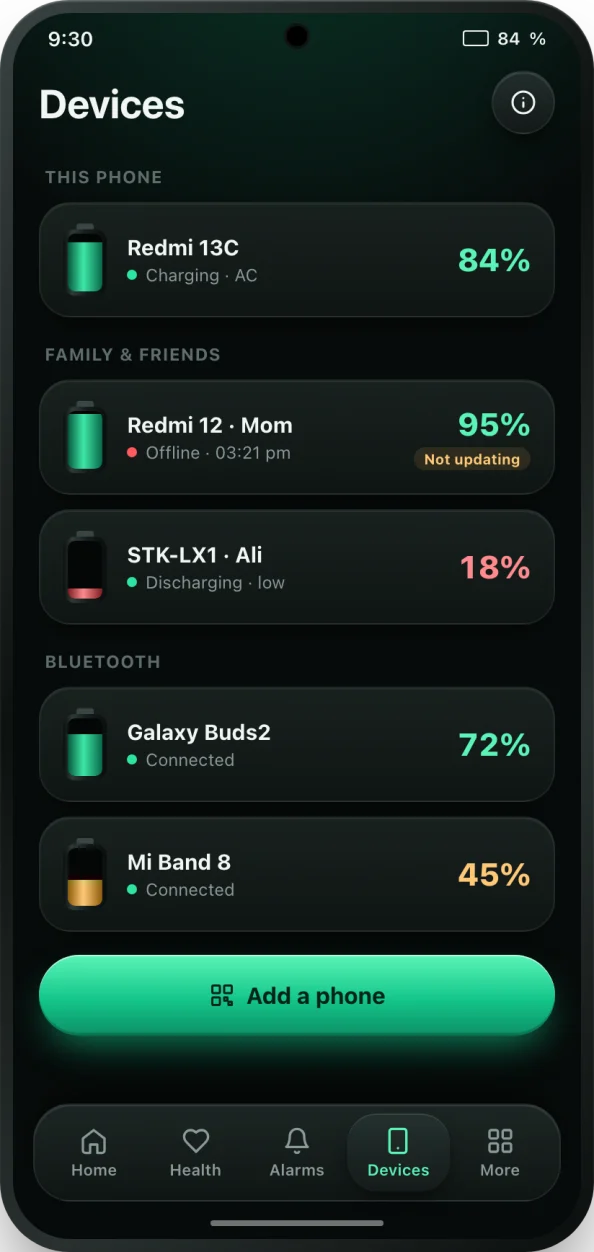
Why check a family member's battery?
A phone on 3% is a phone that is about to stop answering. If your child is on the way home, an older parent lives alone, or a partner is travelling, knowing their battery is low lets you call or text before it dies, or remind them to plug in. It also explains silence: a phone that went offline at 1% is a flat battery, not an emergency.
bCare's Devices tab puts every battery you care about on one screen. It is also handy for your own gadgets: a second phone, a tablet, or the old phone you use as a dashcam or baby monitor.
How to link a family phone
- Install bCare from Google Play on both phones. It is free.
- On the phone you want to watch, open the Devices tab and tap Share this device. bCare shows a QR code for that phone; you can also save or share the code.
- On your phone, open the Devices tab, tap Add a phone and scan the QR code. bCare checks that the code is valid and not your own phone or one you already added.
- Sign in with Google when asked, so the linked phones stay in sync.
- The family phone now appears on your Devices tab with its charge, charging status, temperature and last seen time. Tap it for details.
- Turn on the low battery and offline alerts for that phone if you want to be told when it runs low or stops updating.
Phones report their battery over the internet, so both need a connection to update. If either is offline, the card shows when it was last seen. You can remove a linked device at any time in two taps.
What you can see for each phone
- Battery level and whether it is charging, updated as it changes.
- Battery temperature and voltage.
- Online status and last seen time.
- A notification with the linked phone's charge and status.
- Alerts when the battery is low or the phone stops reporting.
Privacy, plainly
Linking only shares battery information. bCare does not share location, messages, contacts or photos between phones, and it does not track where anyone is. The camera is used only while scanning the QR code; no photos are taken or saved. A phone can only be linked by someone who can scan the code shown on it, so a family member always knows they are being added.
Free and PRO
The free plan lets you link a small number of phones, and you can watch one short optional video to add one more. bCare PRO removes the limit, so you can watch every phone in the family. Earbuds, watches and other Bluetooth devices show up on the same screen; see Bluetooth earbuds and watch battery for how that works.
Want the batteries on your home screen too? The Devices widget lists your linked phones and earbuds at a glance. See all seven battery widgets.