Why Bluetooth battery levels are easy to miss
Android shows a small battery icon for some Bluetooth devices in the quick settings or in the Bluetooth menu, but you have to go looking for it, and many phones only show it for a moment when the device connects. Watches and speakers often have their own app, or none at all. The result is the familiar surprise: you put your earbuds in for a commute and they announce a low battery a few minutes later.
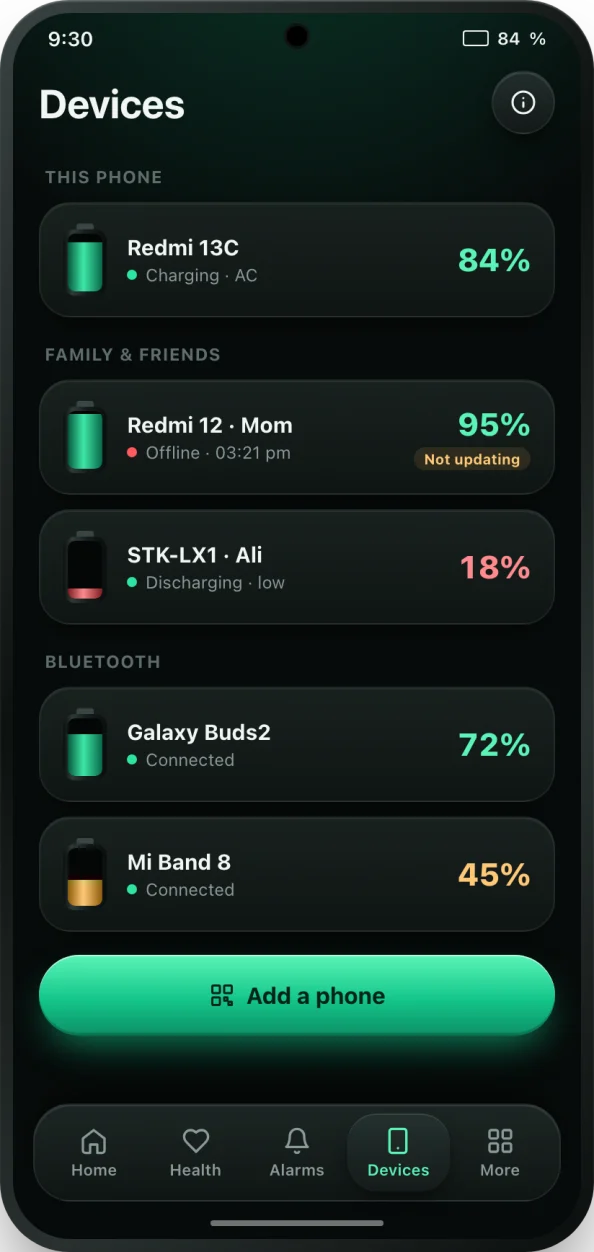
bCare brings those levels into one place. Your phone and every connected Bluetooth device sit together on the Devices tab, so one glance tells you what needs charging before you head out.
What bCare shows for Bluetooth devices
- The battery level of each connected device that reports it, updated while it is connected.
- The battery level each earbud set, watch or speaker reports to Android, shown as one clear percentage.
- A notification with the device's battery when it connects.
- Low battery alerts for earbuds, watches and speakers, with a short tip such as putting the earbuds back in the case.
- Alerts when a device disconnects, with steps to reconnect it.
How to see your earbuds battery in bCare
- Install bCare from Google Play and open it.
- Pair your earbuds, headphones or watch with your phone in Android's Bluetooth settings as usual.
- Open bCare's Devices tab and add a Bluetooth device. Allow the Nearby devices permission when asked; Android requires it before an app can read Bluetooth battery levels.
- Make sure Bluetooth is on. bCare tells you if it is off.
- Connect the device. Its battery level appears on the Devices tab; tap it for details such as its last update and alerts.
- Turn on low battery alerts for that device so you know when it needs a charge.
Which devices work
bCare can show the battery of paired Bluetooth devices that report their battery level to Android: most modern earbuds and headphones, many smartwatches, speakers and some car audio systems. The level is read only while the device is connected; when it disconnects, bCare shows when it was last seen. Some older or very basic devices do not report a battery level over Bluetooth, and no app can show one for them.
The free plan includes a limited number of Bluetooth devices, and bCare PRO removes the limit.
Tips for longer earbud battery life
Put earbuds back in the case when you are not using them; the case charges them and keeps them from draining in your pocket. Keep the charging contacts clean so they sit properly. Avoid leaving the case in a hot car. And charge the case before it is empty, just like your phone. To see family phones on the same screen, read about family and multi-device battery, or add the Devices battery widget to your home screen.