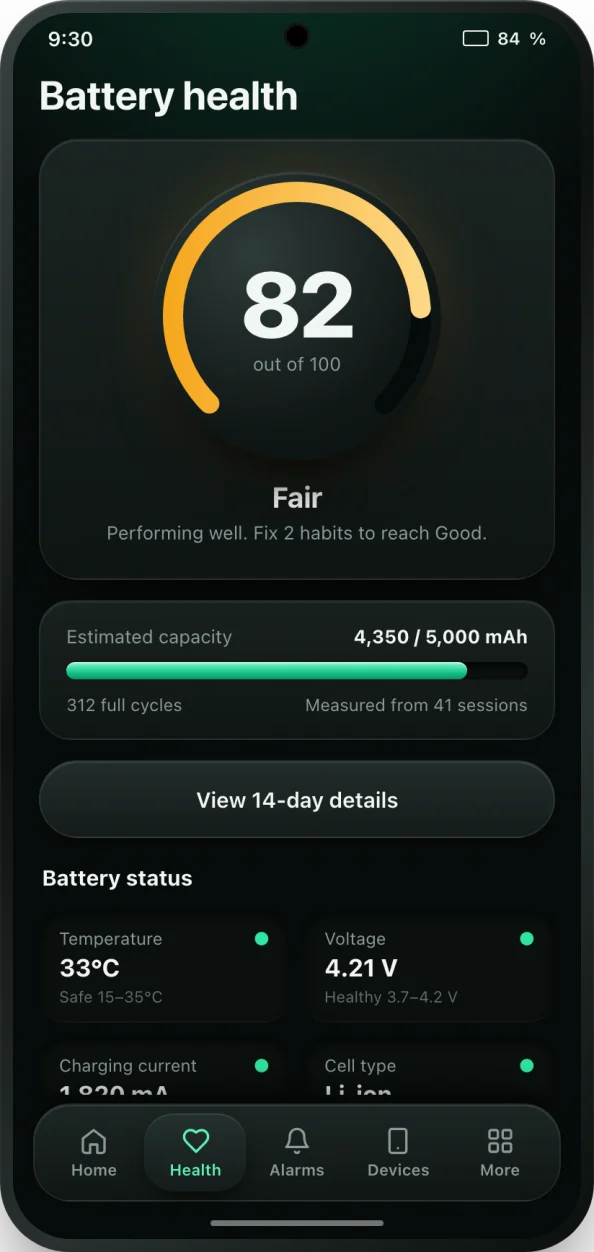
Why Android battery health is hard to check
iPhones show a battery health percentage in Settings. Most Android phones do not. Some show a one-word status, some hide a figure in a diagnostics menu, and many show nothing at all. Yet battery health is the number that decides whether your phone still lasts a day, whether a replacement is worth it, and what a used phone is really worth.
Battery health is usually expressed as the capacity the battery can hold today compared with its design capacity when new. A 5,000 mAh battery that now holds 4,250 mAh is at 85%. Anything above about 85% is in good shape; between 70 and 85% it is worn; below 70% most people notice the phone dying early and a replacement starts to make sense. Many manufacturers treat 80% as the end of a battery's rated life.
How bCare measures battery health
While your phone charges, bCare logs the charging current, voltage, temperature and Android's charge counter every 30 seconds in the background. From charges that run from about 20% to 80% it works out how many mAh actually went into the battery, and from that how much a full charge holds. Until it has a few of those charges, the capacity shows as Measuring, with a count of how many charges are done.
The health score starts at 100 while bCare learns your battery, and after 7 days of monitoring it becomes an accurate picture. Points come off for time spent hot, holding a full charge, deep drains and charge cycles over the last 14 days. Each factor is listed on the Health screen with a plain-language explanation, so you can see exactly what is wearing your battery and what to change.
How to check your battery health with bCare
- Install bCare from Google Play and open it. Allow background monitoring when asked; it is what lets bCare measure charging sessions.
- Open the Health tab. You will see your score, your battery's design capacity and the calibration progress.
- Charge as you normally do. Charges from about 20% to 80% give the most accurate capacity reading.
- After a few charges the estimated capacity appears in mAh, next to the design capacity and the number of full charge cycles.
- Check the 14-day trend to see how capacity, cycles and wear change over time, and tap any number for an explanation.
- Want a record? Export a PDF health report from the Health screen (PRO).
If you already know your measured and design capacity, you can also work out the percentage yourself with our battery health calculator.
What the numbers mean
- Estimated capacity: how much charge a full battery holds today, in mAh. Higher means more screen time.
- Design capacity: what the battery held when it was new, as reported by the phone.
- Full charge cycles: one cycle is 100% of capacity used in total, so two charges from 50% to 100% count as one cycle. Where Android reports a cycle count, bCare shows it; otherwise it estimates cycles from your charging.
- Health score: one 0 to 100 summary of capacity and the habits that affect it.
Tips to keep the score high
Heat is the biggest single cause of battery wear, so keep the phone cool while charging and turn on the overheat alert. Avoid long hours at 100% by using a battery full alarm at 80 or 85%, and plug in before the battery falls very low. Small, frequent top-ups are better for a lithium-ion battery than full drains; it has no memory effect, so there is no need to run it flat.