Why test your charger?
The watt figure printed on a charger is the most it can deliver, not what your phone actually gets. The real speed depends on the charging standard both ends support, the cable, the phone's own limits, the battery level and the temperature. A worn or cheap cable can quietly cut charging speed in half, and a charger that cannot hold a steady current can make the phone run warm.
A charger speed test answers a practical question: which of the chargers and cables you own is the best one to use? It also catches a failing cable early, before it becomes a phone that is still at 40% after an hour on the charger.
How bCare tests a charger
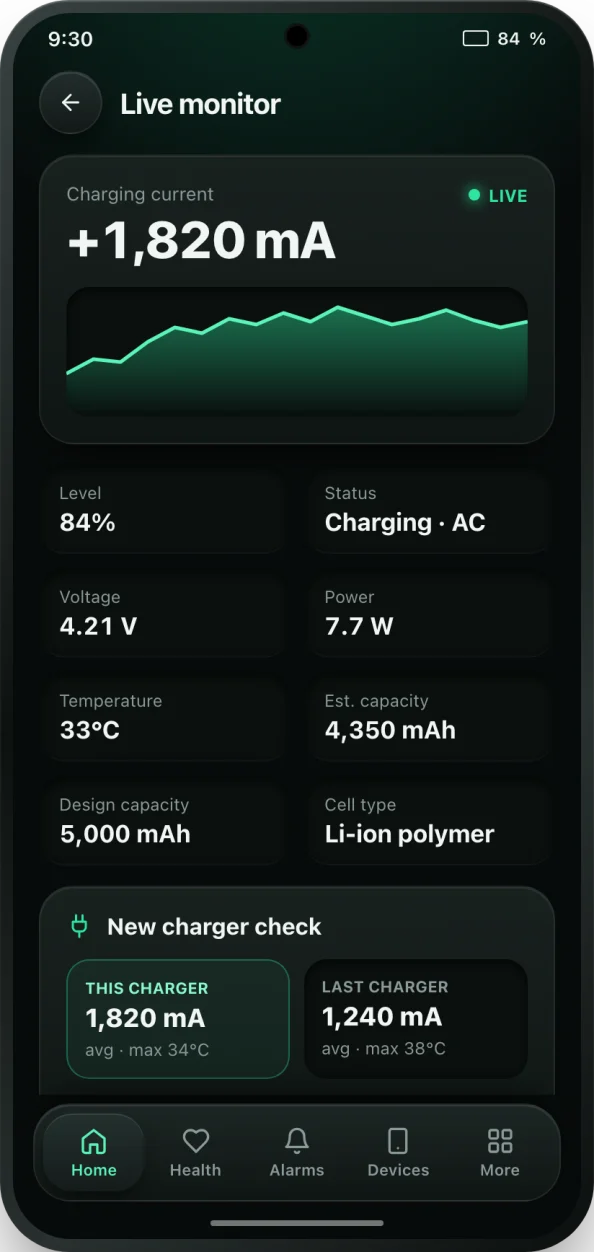
While your phone charges, the live monitor shows the charging current in mA, the voltage, the power and the battery temperature. When you plug in a charger or cable that bCare has not seen before, the New charger check compares it with the last charger you used and tells you in plain words how much faster or slower it charges, as a percentage, whether it runs cooler or hotter, and whether the current stays steady or drops now and then.
Charging sessions are saved in your charging history with their range, duration, peak temperature and charger speed, and sessions with a new charger are tagged, so you can compare chargers over days rather than minutes. PRO keeps the full history.
How to run a fair charger test
- Install bCare from Google Play and open it.
- Start below about 50%. Phones charge fastest when the battery is low and slow down as it fills, so test each charger at a similar level.
- Plug in the first charger and open the live monitor from the Home screen. Leave the screen on bCare for a minute and note the charging current.
- Unplug, then plug in the second charger or cable. Keep charging for a few minutes so the New charger check can compare it with the first.
- Read the result: faster or slower, cooler or hotter, steady or unsteady. If the current drops now and then, try another cable.
- Repeat with your other chargers. Keep the phone out of its case and away from heat so temperature does not skew the result.
Reading the numbers
- Charging current (mA) is how fast power flows into the battery. More current means faster charging.
- Very high currents, above about 2,000 mA on many phones, also make more heat, and heat is what ages a battery. Fastest is not always best overnight.
- Above roughly 80% every phone slows down on purpose. That is normal and not a sign of a bad charger.
- A current that jumps up and down on a steady screen usually points to a loose or damaged cable.
Tips
Use the fastest charger that keeps the phone comfortably cool for daytime top-ups, and a slower one overnight. Replace cables that test unsteady. If a charger runs much hotter than others, stop using it and turn on the overheat alert while you charge. To estimate how long a full charge should take at a given power, try our charging time calculator.