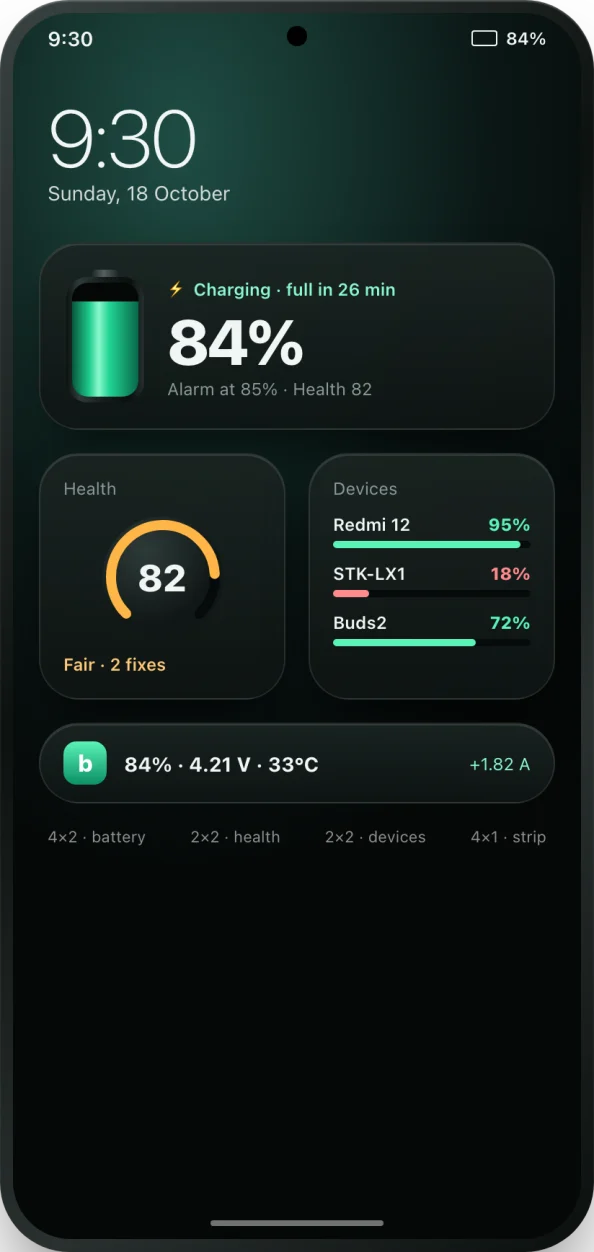
Why use a battery widget?
The battery icon in the status bar is tiny and tells you one thing. A good battery widget turns your home screen into a dashboard: the exact charge, whether it is charging and how long until full, the temperature, and the alarm you set. It saves you opening an app twenty times a day, and it makes problems visible, such as a phone that is running hot or a family member's phone that is nearly flat.
The seven bCare widgets
- Battery: battery level, charging status and your alarm. While charging it shows the time until full; when charged it reminds you to unplug.
- Battery health: your health score at a glance, with its band (healthy, fair or poor).
- Devices: battery levels of your linked phones and Bluetooth earbuds, with offline devices marked.
- Battery strip: level, voltage and temperature in one slim line.
- Temperature: battery temperature and how safe it is, from safe zone to too hot.
- Alarms: your full, low and overheat alarms and their levels at a glance.
- Battery mini: the battery level in a small tile, for a tidy home screen.
How to add a battery widget on Android
- Install bCare from Google Play and open it once, so it can start reading your battery.
- Go to your home screen and touch and hold an empty space.
- Tap Widgets. On some phones the option is in a menu or called Widgets and apps.
- Scroll to bCare, or search for it, and you will see all seven widgets with a short description.
- Touch and hold the widget you want and drag it to your home screen. Resize it if your launcher allows.
- Tap the widget at any time to open bCare.
If a widget ever shows that monitoring is paused, tap it; bCare walks you through turning background monitoring back on so the numbers stay current.
Good widget setups
- Minimal: Battery mini on your main screen, nothing else.
- Battery care: Battery plus Battery health, so you always see the charge, the alarm level and the score.
- Family: Devices on the main screen to keep an eye on family phones and your Bluetooth earbuds and watch.
- Summer: Temperature or Battery strip, so you notice heat before the overheat alert has to ring.
Do widgets use much battery?
No. bCare's widgets show readings that bCare already collects for its alarms and health score, so adding them does not start any extra monitoring. Widgets update on Android's schedule rather than every second, which keeps their cost low. If you want the live, second-by-second picture, open the live monitor in the app.